
Connect Printful to Shopify in Printful, then let ArtDrop build and publish the listing. The Printful connection creates and publishes products, routes orders, fulfills them, and returns tracking.
The Printful integration connects product creation, order import, production, shipping, and tracking. You choose the products, place the artwork, set prices, approve listings and policies, and order representative samples.
This guide walks through the connection, the product setup that matters, and a faster way to handle artwork-specific catalog work.
What the Printful Shopify App Actually Does
The Printful Shopify app is a fulfillment bridge. Once connected and correctly set up, it can handle four useful jobs:
- Order routing. When a customer buys a Printful product on Shopify, the order flows into Printful's fulfillment network. Printful uses its own fulfillment centers and partner facilities, so do not describe every order as guaranteed to run through a wholly owned plant.
- Production and shipping. Printful prints, packs, and ships the item to your customer, and pushes tracking back to Shopify automatically.
- Inventory and variant sync. Sizes, colors, and stock status stay in step between Printful and your Shopify product.
- Mockup generation. Printful's mockup tool renders your design on the blank so you have product images to publish.
That is a useful fulfillment loop. Keep billing, order flow, product sync, stock, returns, and exceptions monitored. Printful can build and publish individual products while you choose products, prepare artwork, approve copy and mockups, test quality, and drive demand.
Connect Printful to Shopify, Step by Step
From Shopify, install Printful, review the permissions, and log in or create an account. A standard account path does not require an optional paid Printful subscription, but product, shipping, taxes, fees, samples, paid-plan upgrades, and payout timing still affect the economics. Confirm current billing terms.
Back in Printful, your Shopify store should now appear under your connected stores. Add a billing method so production charges can settle when orders come in (customers pay you through Shopify, Printful charges you the base cost). Set your shipping and tax preferences here too. This foundation needs to be right before you create the first product.
For each product you want to sell, choose a blank from Printful's catalog, select the print or stitch areas, and configure variants. Embroidery needs different artwork preparation and placement than printing, but it is not Printful-exclusive: Gelato and Printify also document current embroidery catalogs. Compare the exact products, digitization terms, locations, and samples instead of treating the decoration method as a one-provider checkbox.
For every product, you upload your design, position it on the blank, check the print area and bleed, and generate the mockup set. Printful's mockup generator is good, but it is per product and per variant. A photographer with forty images, each going onto a poster, a canvas, and a tee, is now looking at a hundred and twenty placement-and-mockup operations before any listing copy exists.
Publish the product from Printful to Shopify after entering its store details and prices. Printful supplies mockups and variant structure and lets you edit supported listing fields. Add your voice, Shopify collections, and search strategy. Review the title, description, tags, alt text, product type, collections, and prices before launch.
The Creative Decisions You Keep
After the connection is working, these are the product decisions you make:
- The blank, printed and shipped on order
- Variant structure (sizes, colors)
- Mockup images
- Inventory and order sync
- A clear, descriptive product title
- A full product description in your own voice
- SEO tags and search keywords
- Image alt text for every mockup
- Product type, vendor, and collection assignment
- Pricing math per variant
None of these tasks is necessarily difficult on its own. The cost is repetition across products and artworks. Time one representative setup and review cycle, including corrections, then multiply by your catalog.
The Real Time Cost Per Artwork
Walk one image through the full process and the per-artwork cost becomes clear. Say you sell each piece as a print, a canvas, and a t-shirt, three Printful products from one image:
Scroll sideways to compare all columns.
| Task | What it involves |
|---|---|
| Place design and generate mockups | Set the print area and review each product preview |
| Write 3 titles | Describe each product clearly in your shop voice |
| Write 3 descriptions in voice | Cover the artwork and product details accurately |
| Tags, alt text, SEO fields | Add useful search and accessibility text |
| Collections, pricing, publish check | Set prices and confirm the product in Printful |
| Total per artwork | Repeat the complete set for each artwork |
Time one representative product from setup through your final Printful check, then multiply by your catalog.
Use the measured cycle to project the actual collection, including setup, failures, corrections, and review. Repeat the test if you change products, mockups, providers, or listing requirements. Automation earns its keep only if the measured reduction exceeds its setup and verification cost.
How ArtDrop Speeds Up the Catalog Work
Printful keeps its own Shopify connection and fulfillment workflow. ArtDrop writes the listing from your artwork and builds the product on top of that connection.
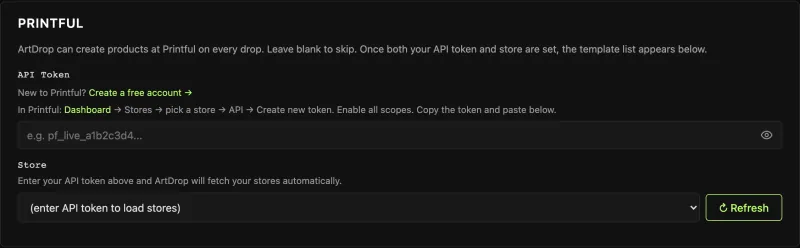
Give ArtDrop a single artwork file and it starts the Printful product work. Printful handles fulfillment after the listing is live.
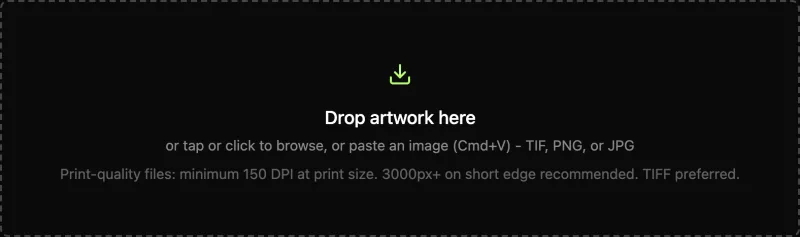
ArtDrop uses the image and Voice Trainer context to draft the product title, description, SEO fields, and alt text. Product tags come from your saved settings and artwork metadata. Treat every field as a draft: verify the depicted subject, product facts, accessibility language, rights, keywords, and store voice before using the resulting record.
Every supported Printful format you selected can be created from that one image. Embroidery has separate file and digitization requirements and is outside ArtDrop's automation.
ArtDrop reads the artwork, writes the title, description, SEO fields, and alt text in your voice, and creates the Shopify product. Printful imports it, and ArtDrop sets your artwork, price, and SKU on the Printful variant, attaches a Printful mockup as the product image, and publishes the listing to the sales channels you chose. You open it in Shopify and check the mockup and the price.
Printful runs its fulfillment and Shopify connection. ArtDrop adds optional artwork-aware copy and builds the product through the store you connect. The ArtDrop web app works on phones, iPads, and desktops, and a native Mac app is available too. The web plan is $39/month and the one-time Mac app is $399. Publishing has no per-product ArtDrop fee. ArtDrop Web includes 500 managed copy credits each month and also supports your own provider key. Mac uses your own key for generated copy. You can always write the copy yourself. Try up to 3 free drops on ArtDrop Web. No card is required. Both paid plans include a 14-day money-back guarantee.
If You Are Setting This Up Fresh
A sensible order of operations if you are starting from zero:
- Connect Printful first. Complete the app authorization, billing, shipping, tax, and store-mapping setup before building the catalog. Record the configuration and recheck it after material account or integration changes.
- Order representative samples before you scale. Quality can vary by product, decoration method, color, facility, and artwork. Test the exact combinations that matter instead of assuming one provider is best across the board.
- Decide your supported formats once. Choose the Printful products ArtDrop supports for your workflow and configure those as your standard set. Handle embroidery separately unless current ArtDrop setup explicitly exposes the decoration method you need.
- Automate the listing work from drop one. The listing treadmill is the part that compounds. Setting up automation before you have a hundred products is far easier than digging out after the backlog has already buried you.
If you are weighing other providers, compare exact products, destinations, total landed cost, delivery estimates, support, and samples. Gelato and Printify use different production-network models; neither is a universal category or price winner. Our Gelato vs Printful and Printful vs Printify breakdowns walk through the exact tradeoffs before you commit.
Connecting Printful to Shopify gives you a solid product and fulfillment foundation. Add clear artwork-specific listings, then review the complete product before launch. That catalog work repeats for every new piece you make.
ArtDrop drafts the artwork-aware copy, builds the product, and publishes the listing. Open it in Shopify and check the mockup and the price.
Frequently asked questions
Does Printful connect to Shopify?
Yes. Printful has a direct Shopify app. It routes orders through Printful's owned and partner facilities and returns fulfillment updates and tracking. A standard account path does not require an optional paid subscription, but product, shipping, taxes, fees, samples, plan upgrades, and payout timing still affect cost.
Does Printful write product listings for me?
Printful's web product flow lets you enter and edit supported listing fields. ArtDrop can draft distinct copy from each artwork in your trained voice and build the product in the Printful store you connect.
Can I automate Printful product creation?
Yes. ArtDrop can draft the title, description, SEO fields, and alt text in your voice and build supported Printful products. When your Printful store is connected to your Shopify store, ArtDrop publishes the listing to the sales channels you chose. Printful also creates and publishes individual store products through Design Maker and handles fulfillment. Embroidery has separate file and digitization requirements and is outside ArtDrop's automation.
Does Printful support embroidery on Shopify?
Yes. Printful supports embroidery, but it is not unique among Gelato, Printful, and Printify; all three currently document embroidery offerings. Compare product selection, digitization, fulfillment locations, and samples. Embroidery is outside ArtDrop's automation.
How long does it take to list a Printful product?
There is no universal duration. Time a representative Printful artwork across the formats you sell, including placement, mockups, fields, pricing, provider processing, corrections, and Shopify verification. Compare the measured manual cycle with an automated test before projecting a collection.