
Gelato connects to Shopify through a direct integration that publishes products, routes orders through its production network, and returns fulfillment and tracking. Gelato's web editor and templates help you create individual products, but they do not turn a folder of original artwork into distinct, voice-matched listings across providers. ArtDrop fills that gap: drop one image, and it drafts the artwork-specific copy, creates every configured Gelato product, and publishes the Shopify listings for you.
Connecting Gelato to Shopify uses an app authorization and account setup flow whose duration depends on billing, permissions, products, and current interfaces. Once a correctly mapped product receives an eligible order, the integration can route it into Gelato and return fulfillment updates. Sellers still monitor payment, holds, addresses, stock, production, delivery, and support exceptions. “Connected” describes the integration, not a fully unattended business.
This guide walks through the real setup, what the integration handles, where it stops, and what that gap costs you per artwork once you are listing at any kind of volume.
What the Native Integration Actually Does
The Gelato Shopify app is a fulfillment bridge. Once connected, it does a specific and useful set of things, and it does them well:
- Syncs products both ways. Products you build in Gelato can be pushed into Shopify as draft or published products, and Shopify products can be linked back to Gelato print products for fulfillment.
- Routes orders through its distributed network. Gelato selects production based on product availability, destination, capacity, and network logic. Do not promise that every order is made in the nearest country; verify the exact SKU and destination.
- Pushes fulfillment and tracking back. When the order ships, Gelato marks it fulfilled in Shopify and attaches the tracking number. Your customer gets the standard Shopify shipping notification with no manual step from you.
- Provides product and price management. Gelato exposes store products, variants, and pricing controls; review availability changes rather than assuming every catalog change will rewrite an existing listing automatically.
That is a real list of work the integration can reduce. Whether the native connection is enough depends on catalog size, product mix, writing needs, review load, and whether you use other providers. The remaining gap is not all listing work; it is distinct artwork-aware copy and repeated creation across a broader provider catalog.
Where the Integration Stops
Gelato lets you enter product details while creating and publishing a product, and templates can pre-populate common information. What it does not provide is distinct copy derived from each artwork in your trained voice, nor a cross-provider catalog pass. Shopify SEO fields, tags, collections, alt text, and the final proof still need deliberate attention.
Connecting Gelato to Shopify, Step by Step
From Gelato's stores area, connect Shopify or install the Gelato app and approve the requested permissions. A standard account path does not require Gelato's optional paid subscription, but production, shipping, taxes, fees, samples, paid-plan upgrades, and payout timing still affect cost. Confirm current checkout and billing terms.
Use Gelato's web dashboard for new-product setup. Build the product types you want to sell: a framed print in three sizes, a poster in two sizes, a canvas, whatever your catalog needs. Set the format, sizes, substrate, options, and retail pricing, then save reusable templates where they help. Gelato's current mobile help is explicit that its native app can manage stores, orders, analytics, product prices, and design work, but creating a new product redirects you to the web portal, so plan on the web dashboard for new products.
For every artwork, you still need artwork-specific title and description copy, Shopify SEO fields, tags and collections, image alt text, price review, and a final variant check. Gelato can carry common template information; it does not know how you describe each original piece or coordinate the same artwork across Gelato, Printful, and Printify.
What Manual Listing Actually Costs
It is easy to wave off "write the description" as a two-minute task. It is not, not if you do it properly. Here is what a single artwork listing actually involves once the Gelato product is connected:
Scroll sideways to compare all columns.
| Listing task | What it involves |
|---|---|
| Product title | Descriptive, keyword-aware, distinct from your other pieces |
| Description | Subject, mood, room-fit, sizing notes, in your own voice |
| SEO fields | Meta title, meta description, URL handle |
| Tags and collections | Color, subject, style, room, assigning to the right collections |
| Alt text | Accurate per-image alt text for accessibility and search |
| Variant cleanup | Naming, ordering, and checking every size and frame variant |
Time one representative product from setup through your storefront check, then multiply by your catalog.
Use the measured test to project the real catalog. Add provider setup, corrections, failures, and review, then rerun the model when products, variants, or Gelato's terms change. If you also use Printful or Printify, include their provider-specific work instead of assuming one timing applies to all.
Speed does not guarantee discoverability or sales. Accurate fields, useful copy, strong products, pricing, traffic, and customer experience all matter. Automation should reduce entry without weakening verification.
How ArtDrop Does the Listing For You
This is exactly the gap ArtDrop was built to close. The native integration owns fulfillment. ArtDrop owns the listing. Together they cover the whole job.
You drop artwork after configuring templates, variants, prices, accounts, and stores. ArtDrop drafts fields with Voice Trainer context, creates supported Gelato products, and publishes the Shopify listings. Always inspect placement, variants, prices, copy, shipping, provider responses, and mapping.
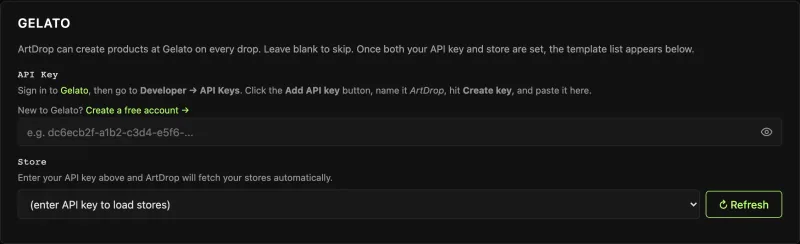

ArtDrop works alongside the Gelato-to-Shopify connection. It drafts fields, creates products, and publishes Shopify listings, while Gelato handles provider routing and fulfillment updates. The Web demo includes up to 3 drops to test a representative product. Review the finished product and listing.
Because ArtDrop supports more than one provider in the same workflow, the same drop can also create products at Printful and Printify if you run them alongside Gelato, so multi-provider sellers write a listing once, not three times. If you are still deciding which providers to run, the Gelato vs Printify breakdown, the Gelato vs Printful comparison, and the broader guide to selling art prints on Shopify are good next reads. And if you later add Printful for apparel, the Printful to Shopify connection guide walks the same setup for that provider.
The Bottom Line
Connecting Gelato to Shopify gives you product publishing and a mature fulfillment rail. Gelato's own tools can create individual products and reuse templates; the remaining gap is distinct artwork-aware copy and cross-provider bulk publishing. Use ArtDrop for that repeatable front half while Gelato keeps doing fulfillment.
Frequently Asked Questions
Does Gelato integrate with Shopify directly?
Yes. Gelato has a direct Shopify integration that syncs products, routes orders through its distributed production network, and returns fulfillment status and tracking. Production location depends on product availability, destination, capacity, and network logic; it is not guaranteed to be the nearest country. Optional plans, production, shipping, taxes, fees, samples, and payout timing still affect cost.
Does Gelato write my product descriptions?
Gelato lets you enter product details and reuse templates, but it does not derive distinct, voice-matched copy from each original artwork or coordinate a cross-provider catalog pass. ArtDrop fills that narrower gap by reading the image, drafting the listing copy in your voice, creating selected Gelato products, and publishing the Shopify listings.
How long does it take to list a Gelato product on Shopify?
There is no universal duration. Time a representative Gelato SKU from product setup through Shopify verification, including fields, variants, mockups, pricing, corrections, and review. Compare that measured process with an automated test before projecting a catalog-wide saving.
Can I automate Gelato listings on Shopify?
Gelato's own tools create and publish products and handle fulfillment within Gelato's ecosystem. ArtDrop adds artwork-specific drafts and a multi-provider workflow. It publishes Shopify listings that still need seller checks and works alongside, rather than replacing, Gelato's connection.
Do I need to upload my images twice?
No. With ArtDrop you drop the image once, and it handles the artwork analysis, the listing copy, the Gelato product creation across your selected formats, and the Shopify publish from that single upload. You do not re-upload the file into Gelato and again into Shopify. Your Gelato and Shopify accounts remain your own throughout.