
You can automate Printify product creation three ways. Inside Printify, its web product creator and native iOS/Android apps can create, design, and publish products. The Printify API can upload artwork, create products, and publish them programmatically when you supply and maintain the code. ArtDrop starts with the artwork, drafts listing fields with Voice Trainer context, creates products at Printify, Gelato, and Printful, and can publish through supported Printify and Gelato store connections. A standalone Printful store keeps the product for you to publish later. With a Shopify-connected Printful store, ArtDrop creates a live Shopify listing.
Printify already removes meaningful work: its native mobile apps support creating, designing, editing, and publishing products, and its product creator includes Smart Suggest for listing text. The remaining scale problem is repetition across a large artwork catalog or several providers. Every product still needs a blueprint, print provider, variants, placement, price, listing review, and destination.
This guide assumes your Printify account is already linked to your store. If it is not, follow the authorization, billing, and test-order steps in the guide to connect Printify to Shopify. Once connected, Printify handles order import, fulfillment status, and tracking after a sale. This post covers the product work that happens before launch across all three options, including the ones that do not involve my product.
What does automating Printify product creation actually mean?
It means reducing the per-product manual work that happens before a listing can sell. The Printify Shopify connection can handle order routing, production status, and tracking after the sale when its settings and product mapping are correct. “Automation” here is about the seven jobs that repeat for every product you create.
- Upload the artwork file. Every product starts with the image landing in Printify's media library.
- Pick the blueprint and print provider. Printify is a marketplace, so for each product type you choose which independent print partner fulfills it.
- Select the variants. Sizes, colors, and materials. This one has a hard limit we will get to.
- Position the artwork. Scale and place the image inside each print area.
- Write and review the listing. Title, description, relevant tags, alt text, and product facts. Time this step on one representative artwork; it is usually the slowest.
- Set the retail price. Margin math on top of the partner's base cost.
- Publish and review. Push to Shopify, check the draft, set it active.
Each route below automates a different slice of that list. Treat print-partner selection as a merchant decision supported by current prices, routes, policies, and representative samples. A tool can reuse a chosen setup; whether that partner is right for each product is still your call.
What can you automate inside Printify itself?
More than duplication. As of July 2026, Printify's web product creator and native iOS/Android apps can browse the catalog, create and design products, edit mockups and listing fields, set prices and preferences, and publish to connected stores. Duplication remains useful because a copy can carry forward the blueprint, print provider, variants, placement settings, and pricing. Smart Suggest can also generate an SEO-oriented title, description, and tags inside the product workflow.
For a handful of products it genuinely helps. If you sell one poster format and you are publishing five new pieces this month, duplicate, swap the art, and you have skipped the blueprint, partner, variant, and pricing steps four times.
Here is where it stops. Duplication copies settings, but you still open each copy, replace and position the artwork, confirm the variants, review or replace the listing text, and publish. Smart Suggest reduces the blank-page problem, but it does not learn a separate trained voice for each of your stores or turn one artwork into products at Gelato and Printful too. The useful distinction is not “Printify cannot create products.” It can. The distinction is first-party, Printify-only product work versus an artwork-first, multi-provider pipeline.
Can the Printify API automate product creation?
Yes. The Printify API is the most complete first-party automation Printify offers, and ArtDrop itself is built on it, so this is first-hand. With code, you can upload images to the media library, read the catalog (blueprints, print providers, and their variants), create products with the artwork positioned in the print areas, set variant pricing, and publish the result to a connected Shopify store. A script can repeat that sequence across a folder, but runtime and success rate depend on file size, provider responses, rate limits, retries, and the review required for each result. Measure them on your own catalog.
What the API cannot do is just as important:
- It will not write your listings. The product create call accepts a title and description as plain fields. The words are still yours to produce, per product. An API script with empty copy just automates the creation of bad listings.
- It will not pick your print provider. Your script has to name a provider ID. Which one deserves your products is still a sampling-and-judgment call, the same one the setup guide walks through.
- It will not maintain itself. Real scripts need API token handling, rate-limit backoff, retries on failed uploads, error logging, and somewhere to run. That is a small software project, not a weekend hack, if you want it to survive a 300-file batch.
The 100-variant cap that breaks apparel uploads
Printify documents a limit of 100 variants per product, and a create request over the limit can fail. Wall art with a small size set may stay below it, while apparel combinations multiply quickly: 25 colors across 8 sizes would create 200 combinations. If a script selects every available variant by default, one product class may fail while a smaller variant set succeeds.
The fix is to curate. Pick the colors and sizes you actually intend to sell and keep each product under 100 combinations, or split one design into two products (light colorways and dark colorways is a common split). Configure ArtDrop templates under the same limit; do not assume an oversized provider selection can be published unchanged.
When is the API overkill?
The API can fit a custom catalog when a developer owns the system. Cost may include engineering, hosting or runners, monitoring, storage, connected image or writing services, security work, and maintenance, not only time. The API accepts fields your system supplies; it does not itself create artwork-informed copy, though your code can connect a capable service. Prototype the full chain and compare successful records, corrections, review, and total cost with packaged and manual routes.
How do you automate Printify product creation without code?
Use a tool that drives the Printify API and handles the writing. That is what ArtDrop was built for, so the walkthrough below uses it. Other no-code tools are worth a look: the Shopify POD automation roundup compares the field. Bulk POD Product Creator, for example, automates creation on Printify and Gelato by cloning a hand-built example product. Its 14-day trial is capped at 100 products, followed by subscription and per-product pricing. It does not support Printful. The full comparison has the details.
The ArtDrop version of the workflow:
The standard app connection, covered start to finish in the setup guide. This gives you order routing and fulfillment. Everything below sits on top of it.
Link the supported Printify account and Shopify store for the workflow you intend to run. If you also use Gelato or Printful, connect those supported accounts too. Each store keeps its own storefront connection, provider destination, voice, product lines, and templates. Select the active store or send a batch with store and line fields.
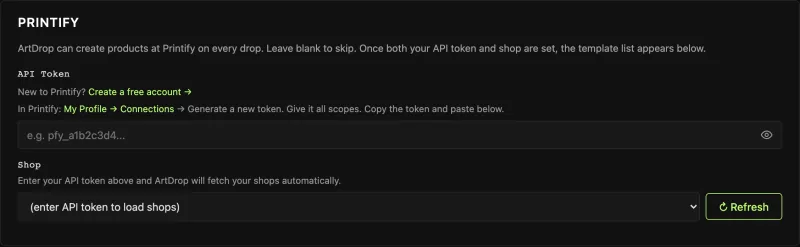
Choose which product types you sell, which print provider makes each one, and which variants you offer. Vet partners with samples and keep each Printify product under the 100-variant cap. Reuse the configuration, then revisit it when products, costs, providers, or regions change.
ArtDrop builds a writing profile from your own Reddit data export, your website, or documents you upload, so the listings read like you wrote them instead of like a template. Skip it and the copy is still artwork-aware, just less yours.
ArtDrop reads the image, drafts the title, description, SEO fields, and alt text, creates the Printify products, and publishes the corresponding Shopify listings. Product tags come from your saved settings and artwork metadata. Check artwork placement, variants, price, and copy before promotion or scale.
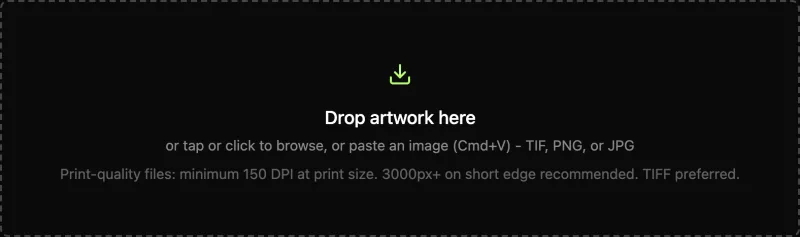
What the Printify route produces
Scroll sideways to compare all columns.
| Output | What the route sends or records | What you still verify |
|---|---|---|
| Artwork file | One image upload and one placement for the configured Printify product | The exact file, scale, position, and print area in Printify |
| Product and variants | The saved blueprint, print provider, prices, and up to the first 100 saved variant IDs | Blueprint, provider, enabled variants, and retail prices |
| Publish request | Title, description, images, variants, and tags | Every field on the Printify product |
Published means the product’s publication step has completed. Open the storefront to check the listing customers will see.
The web app runs in a mobile or desktop browser. Publish a batch from your desk, then start the next piece from a tablet or phone when that is convenient. The mobile guide covers the browser workflow.
You choose the print partner from current prices, policies, and physical samples. ArtDrop handles the repeated product and listing work. The hosted web app is $39 a month and includes 500 managed copy credits each month, with support for your own provider key. Publishing is unlimited and has no per-product fee. Try up to 3 free drops on ArtDrop Web. No card is required. The compare page has the time and cost math, and the FAQ covers setup and refunds. Cancel any time from your Account page. Access runs to the end of the billing period.
Which option should you pick?
Recap: what each route actually automates
Scroll sideways to compare all columns.
| Per-product job | Printify duplication | Printify API | ArtDrop |
|---|---|---|---|
| Artwork upload | Manual (swap per copy) | Automated | Automated (the drop) |
| Blueprint, provider, variants | Copied from the original | Automated (your script decides) | Automated (configured once) |
| Artwork placement | Copied, then adjusted | Automated | Automated |
| Title, description, tags, alt text | Copied, then edit or use Smart Suggest | Manual (fields exist, words do not) | Automated, in your voice |
| Pricing | Copied | Automated | Automated |
| Shopify publish | Manual, per product | Automated | Automated |
| Other providers (Gelato, Printful) | No | Separate APIs, separate code | Same drop, all three |
| Print partner judgment | Yours | Yours | Yours (by design) |
Snapshot as of July 2026. Printify's native apps can create, design, edit, and publish products; Smart Suggest can draft listing fields. Features and API behavior can change, so confirm current details in Printify's documentation.
In one paragraph: Printify's web and native-mobile tools can create and publish products, duplication reuses setup, and Smart Suggest can draft the listing. The Printify API adds programmable scale but requires code, expects your system to supply the listing fields, and rejects products above 100 variants. ArtDrop is the artwork-first option: it writes in your trained voice and creates products at Printify, Gelato, and Printful in one drop. Supported Printify and Gelato connections can publish store listings. You choose the print partner. For the whole-store workflow, read automating Shopify POD listings; if you are still choosing a provider, start with Gelato vs Printify.
Connect Printify to Shopify, vet print partners with samples, and let ArtDrop take the repeated artwork-to-product work. It drafts the title, description, SEO fields, and alt text with Voice Trainer context, creates products at Printify, Gelato, and Printful, and can publish through the supported Printify connection. The Web demo includes up to 3 drops so you can test a real piece first. Publishing has no per-product fee.
Automating Printify product creation is not one decision, it is a match between your catalog size, your comfort with code, and how much the writing weighs on you. Five products a month, duplicate and move on. A developer with a warehouse of designs, the API will serve you well once you respect the 100-variant cap and accept that the copy is still on you. An artist with a backlog and a Shopify store, use a pipeline that writes as well as it publishes. Whichever route you take, the products that sell are the ones that actually get listed, and the best automation is the one that gets your backlog out of a folder and into your store.
Frequently Asked Questions
Can you automate Printify product creation?
Yes, three ways. Printify's own web and native-mobile tools can create, design, edit, and publish products; duplication reuses setup, and Smart Suggest can draft listing fields. The Printify API can create and publish products programmatically but requires maintained code. ArtDrop drafts fields with Voice Trainer context, creates Printify products, and publishes the corresponding Shopify listings through the supported Printify connection. Review the finished product and listing before expanding a batch.
Does Printify have bulk product creation built in?
Printify has a capable first-party product workflow. As of July 2026, its web product creator and native iOS and Android apps can create, design, edit, and publish products. Duplication reuses setup, and Smart Suggest can draft an SEO-oriented title, description, and tags. Large artwork catalogs still require repeated product-by-product review, and the workflow remains Printify-specific.
What can the Printify API automate?
The Printify API can upload images to the media library, read the catalog of blueprints, print providers, and variants, create products with the artwork positioned in the print areas, set variant pricing, and publish the result to a connected Shopify store. It cannot write your listing copy (the title and description are plain fields your code must fill), it cannot choose which print provider deserves your products, and it needs real engineering around it: token handling, rate-limit backoff, retries, and hosting.
Why does Printify reject products with more than 100 variants?
Printify enforces a hard limit of 100 variants per product, and the API rejects a create call above it. Variants multiply: a shirt in 25 colors and 8 sizes is 200 combinations. Curate the colors and sizes so each product stays under 100, or split one design into separate products. ArtDrop templates follow the same limit.
How do I automate Printify product creation without coding?
Use Printify's own web or native-mobile product creator for a first-party no-code workflow, including duplication and Smart Suggest. For an artwork-first multi-provider workflow, ArtDrop connects your Printify and Shopify accounts, reuses your product formats under the 100-variant cap, drafts copy in your trained voice, creates Printify products, and publishes the Shopify listings. Try up to 3 free drops on ArtDrop Web. No card is required. The web plan is $39/month. Publishing is unlimited with no per-product fee.