
Publish artwork from your phone or tablet.
Open ArtDrop Web in Safari or Chrome, choose finished artwork, and follow each product from upload to its provider or store.
Can you really run print on demand from your phone?
Yes. Upload finished art, follow the Live Log, and review the result from Safari or Chrome. A larger screen can make first-time account connections more comfortable, but routine publishing works from your phone.
The hard part of mobile POD is usually the listing work, not the artwork. Titles, descriptions, tags, and alt text add up quickly across several products.
ArtDrop handles that repeated work from one image. Drop the art, review the copy and product where they were created, and edit supported Shopify fields in ArtDrop Products. Use a larger screen when you want more room for detailed image work or store administration.
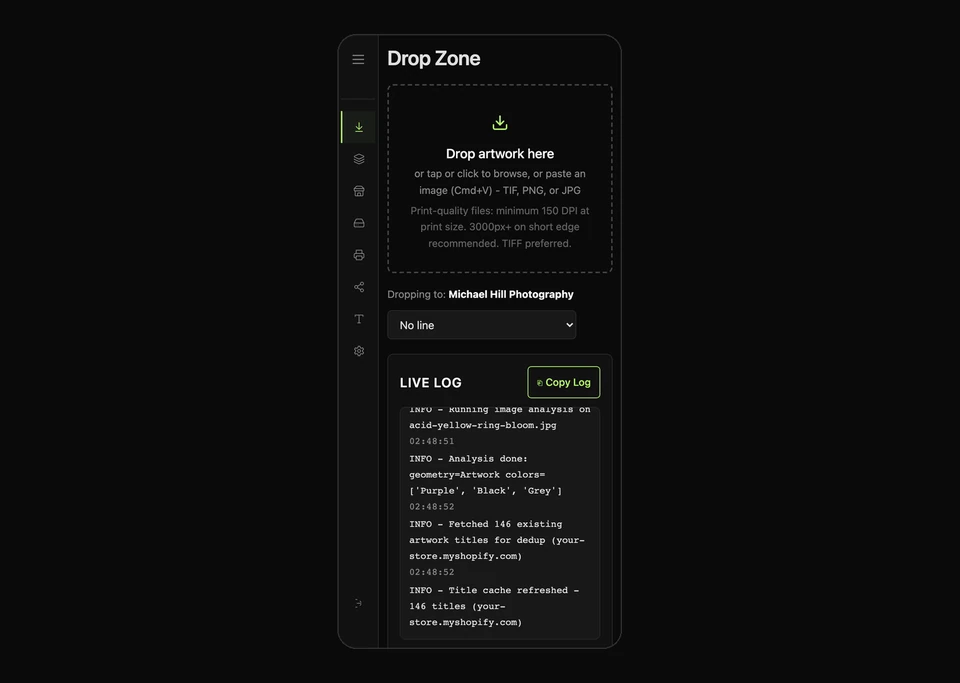
What you need to run POD from your phone (and what you don't)
Before using your phone, save and test one supported store route, storage connection, product setup, and copy choice. Then keep finished artwork in Files or your photo library.
- A phone and a browser. iPhone or Android, Safari or Chrome. That is enough for the recurring ArtDrop release workflow.
- Artwork you own. A photo from your camera roll, a design, an illustration. PNG or JPG is fine. Higher resolution prints better.
- A tested destination. First-run setup can use Shopify or Etsy as the only storefront. Etsy digital downloads require the exact authorized shop and supported storage. Physical Etsy products use your exact Etsy-connected Printify shop or Gelato store. ArtDrop creates the product in your Printful store, ready for you to finish in Printful.
What you do not need
- A computer for each release. ArtDrop runs in your phone's browser. Detailed editing and administration may still be easier on a larger screen.
- An app to install. Nothing to download from an app store. You open a web address and sign in.
- A separate listing-writing tool. Use an available Copy Engine method or provide your own listing fields.
- Bulk inventory. Print on demand means nothing is made until someone buys it. You still need to budget for your storefront, software, transaction fees, and the provider charge when an order is submitted.
Connecting a store and print provider means moving between dashboards, so a laptop is more comfortable for initial setup. Once those settings are saved, routine drops can run from your phone. You can also set up with several browser tabs on the phone if you do not have a laptop.
How print on demand from your phone actually works
Upload finished art and choose the copy, products, and supported store listings you want. ArtDrop prepares them together. Follow the Live Log, then open the named store or provider to review the result. Your store and print provider keep handling later orders and fulfillment.
From camera roll to a product
Open ArtDrop in your phone browser and choose an image. An available Copy Engine method can draft a title, description, SEO fields, and alt text from the picture and your Voice Trainer context. Product tags are assembled separately from configured and analyzed metadata sources. You can also provide your own copy. ArtDrop continues through product creation, and you review the finished result afterward.
Who prints and ships your products
Gelato and Printify create physical products through supported store connections. ArtDrop creates the product in your Printful store, ready for you to finish in Printful. Gelato V2 creates Shopify product data. A live publication reaches Shopify Online Store only after ArtDrop verifies the exact Gelato connection for every intended variant. Missing connection evidence keeps the product unpublished and requires a manual connection handoff in Shopify. ArtDrop creates product and listing data only. It does not access orders, customers, payments, shipping, or fulfillment. It does not relay orders or provide checkout.
Where your products sell
Shopify and Etsy are live. Etsy digital downloads publish directly, while physical Etsy products publish through your own Etsy-connected Printify shop or Gelato store. Open the named result from your phone to review the final listing.
Run the saved release from one phone
Choose the finished file, follow its progress, and inspect the exact result.

Many setups split creativity in two. You make the art in one place, then return to a computer to turn it into a product. The photo you meant to list, the sketch you meant to upload, or the painting you finished on the plane can sit in your camera roll because the publishing half of the job still feels like desk work.
ArtDrop narrows that gap. Once your stores and products are set up, you can turn finished art into products and review the result from a phone or tablet. A routine release no longer has to wait for a desk.
The photographer's recurring phone workflow
Snap the shot. Tune it in Lightroom or Snapseed. Open ArtDrop in the same browser, check the store badge, and drop the edited photo. Follow the Live Log, then open the named store or provider to review the product.
How to publish your first product from your phone
Sign in from your phone browser, check the store badge, tap the Drop Zone, and choose a photo. ArtDrop prepares your selected products. Follow the Live Log, review the result, and edit it in ArtDrop Products or the service that owns it.
-
1Open
Open ArtDrop in your phone's browser
Go to app.getartdrop.com in Safari or Chrome. There is nothing to install. Your first sign-in is a magic link: enter your email, tap the link we send, and you are in, no password to type on a phone keyboard. After that you can turn on a passkey, so future sign-ins are one tap of Face ID or Touch ID.
Sign in. Sign in with a magic link, no password, then add a passkey for one-tap returns. 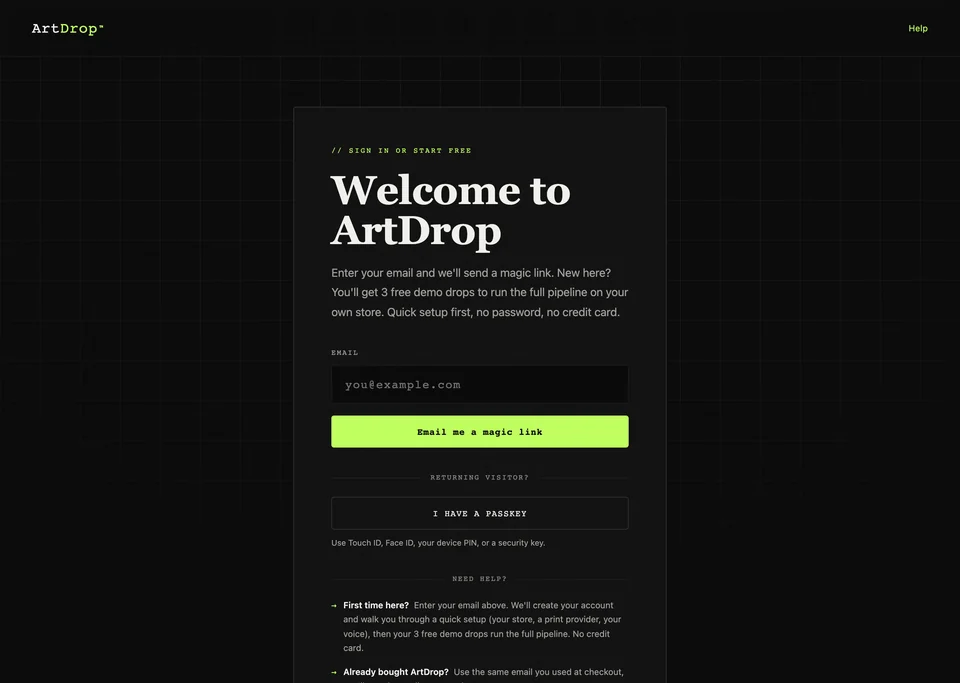
Tip: add ArtDrop to your home screen (Share, then Add to Home Screen) so it opens in its own window with an icon, like an app, without being one.
-
2Drop
Choose a photo from your camera roll
Tap the drop zone and pick an image from your Photo Library, or a file from your Files app. You can select one or many at once. ArtDrop accepts TIF, TIFF, PNG, JPG, and JPEG artwork uploads. No format alone proves print quality.
Drop Zone. Drag, choose, or paste artwork and follow its upload progress. The screen shows an illustrative example. 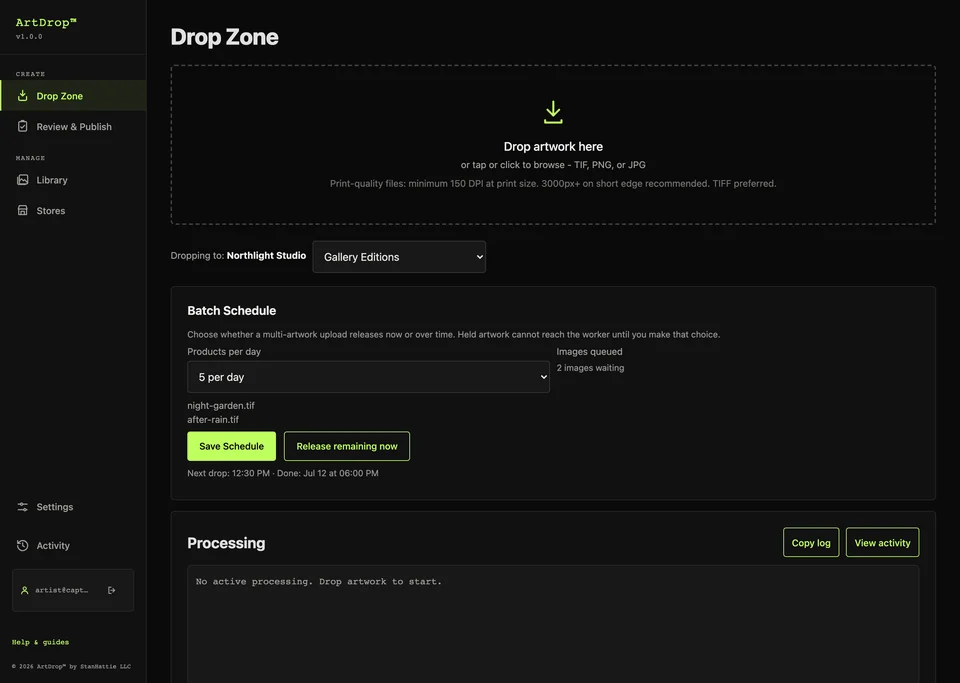
For sharp prints, use a large original, not a screenshot. Follow the exact pixel dimensions, aspect ratio, color guidance, and effective-resolution recommendation for the largest configured print area. Inspect provider warnings and order representative samples.
-
3Write
Choose your copy
ArtDrop can draft the title, description, SEO fields, and alt text from the artwork and your saved writing rules. You can also supply your own words. Review the completed listing before sharing it.
-
4Publish
Watch each product take shape
ArtDrop creates the compatible product formats you selected. The Live Log opens when the upload starts processing and shows the available stages and destinations. ArtDrop creates the product in your Printful store, ready for you inside Printful. For Gelato V2, finish the Shopify Online Store publication step in Shopify when needed. Then open each named result.
Live Log. Live Log opens when processing starts and follows the artwork through its selected provider and store. 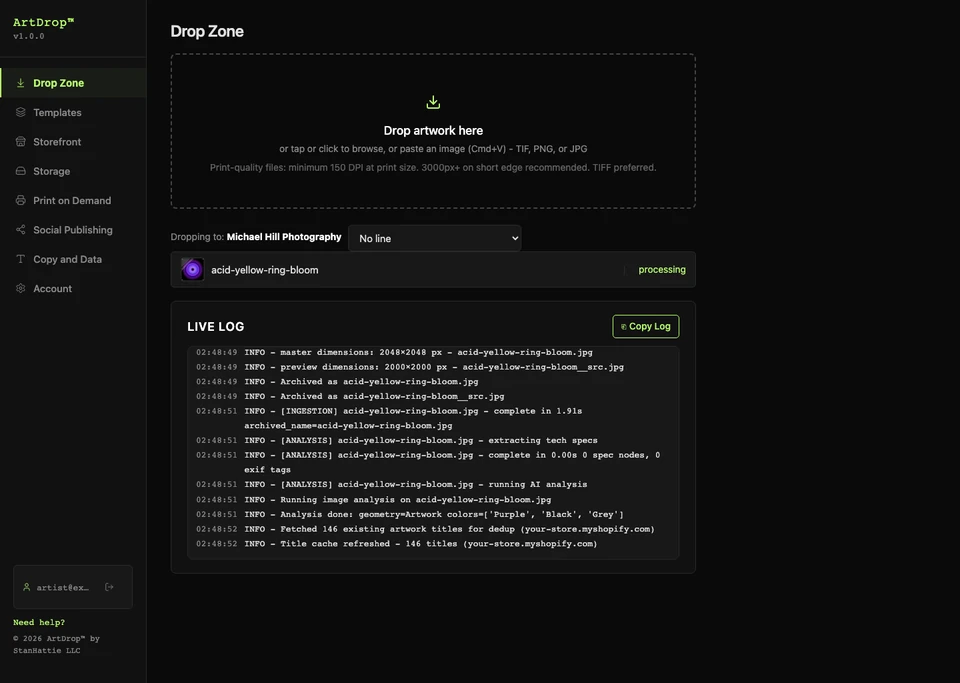
-
5Repeat
Check the results and drop the next one
Open the exact provider and Shopify or Etsy destination in the same browser. Inspect what was created, edit supported Shopify copy in ArtDrop Products when needed, and reconcile any target error before the next drop. The recurring loop can stay on your phone.


Made it on a tablet? Paint it and publish it on the same iPad
ArtDrop's responsive web app also runs on an iPad or Android tablet. Paint in Procreate, export a PNG, open ArtDrop in Safari, drop it, follow the Live Log, and inspect the result. Once setup is complete, that recurring loop can happen on one device.
Provider mobile tools are more capable than they used to be. ArtDrop starts with finished art, writes image-aware copy in your saved voice, and prepares the selected Gelato, Printful, Printify, Shopify, or Etsy work in the browser. Each provider and store still determines where the final result appears.
Procreate to storefront, no handoff
ArtDrop accepts TIF, TIFF, PNG, JPG, and JPEG artwork uploads. Tablet art apps can export supported PNG or JPG files, but not every format those apps produce is accepted. The publishing workflow can still begin in the browser from a supported export:
- Paint your piece in Procreate, Fresco, or Photoshop on the iPad.
- Export a PNG or JPG to your Photos or Files.
- Open app.getartdrop.com in Safari on the same iPad.
- Drop the file, follow the Live Log, and open the named store or provider result.
No Chrome extension is required. iPadOS does not run desktop Chrome Web Store extensions, although Safari has its own extension system, so tools that specifically require a desktop Chrome extension need separate iPad support. ArtDrop is a web app, not an extension. The tablet you make art on can also run the recurring release workflow.
The best things to sell from your phone
Wall art, apparel, and home goods are common choices because one image can suit several products. The right formats depend on the artwork, audience, production cost, and store.
For artists and illustrators
Your work may translate to posters, fine art prints, framed canvas, apparel, tote bags, and more. One drop can prepare the formats you selected. Open each named result to review the set.
For photographers
Your camera roll can hold finished work you already own. A suitable high-resolution photo may become wall art, a metal or acrylic print, or a canvas through the same phone you shot it on. Exact processing time and product acceptance depend on the file, connection, provider, and template. If you work like an artist, the workflow above is yours too; the formats just lean toward large-format prints.
For designers
Patterns, lettering, and illustration can fit phone cases, mugs, stationery, and apparel. Drop the file to prepare your compatible products, then review them at the provider and in Shopify or Etsy.
Why image-aware copy makes phone-first POD work
Listing copy is one major phone bottleneck in print on demand. Reducing repeated title, description, tag, and alt-text work makes a small-screen release workflow more practical, while design, review, pricing, and marketing still require judgment.
Think about where the hours go. After making the art, you still need an accurate title, a useful description, relevant tags, alt text, variants, and pricing for the product formats you sell. The time varies widely by seller and product, but that repeated work compounds quickly across a catalog.
Typing that material repeatedly is exactly what a phone is bad at. When you select an available Copy Engine method, it reads the image, drafts the title, description, SEO fields, and alt text, and applies the voice you trained. Product tags are assembled separately from configured and analyzed metadata sources. The signed-in app shows any limits or billing before generation. You can instead provide seller-written copy. Inspect the completed result and edit it in the surface that owns it. Generic template descriptions read like every other store; copy grounded in the actual artwork and the creator's own writing gives the listing something specific to say.
Compare mobile publishing tools
Printify, Printful, and Gelato offer their own mobile workflows. See the current comparison for the exact creation, publishing, and review steps each one supports.
How much does it cost to start print on demand from your phone?
You can test the workflow without buying inventory, but a live store is not cost-free. Budget for Shopify, ArtDrop after the demo, payment and marketplace fees where applicable, and the print provider's charge when each order is submitted.
Phone publishing uses ArtDrop Web. Try up to 3 free drops on ArtDrop Web. No card is required. ArtDrop Web is $39 per month. Up to 25 stores per account. Your first store is included. ArtDrop Web includes a 14-day money-back guarantee. See Pricing for added-store prices and costs from connected services.
Print providers generally charge your saved payment method when an order is submitted, which may happen before your storefront payout arrives. Keep enough working cash or credit for that gap. Want to compare ArtDrop with separate publishing, listing, and mockup tools? The comparison page lays out the software side.
Is print on demand from your phone a good side hustle?
It can be, but there is no income guarantee. You avoid buying bulk inventory, while still carrying software, storefront, advertising, returns, and order-funding costs. Results depend on the work, audience, pricing, demand, and promotion.
Removing repeated listing work can help you publish a deeper, better-maintained catalog. That creates more pages that can be discovered, but volume does not replace product quality, rights clearance, pricing, or marketing.
Your first sale could arrive quickly, take months, or never arrive. Treat the phone workflow as a way to publish consistently, then judge the business by actual traffic, conversion, margin, returns, and repeat customers.
Common mistakes when running POD from your phone
Check file resolution, listing copy, product details, and the named result before sharing a listing.
- Uploading tiny images. A screenshot or a heavily compressed photo may print soft. Use a large original sized for the exact product template and largest configured print area. Inspect provider warnings and order representative samples.
- Shipping generic descriptions. Copy that could describe any store gives buyers little specific information. Train your brand voice, then check each draft against the actual work.
- Skipping the result check. Open the named result and confirm its copy, artwork placement, price, and variants.
- Never sharing your store. Publishing is not marketing. Post the work, link the store, and let each drop double as a reason to show up on social.
- Trying to do first-time setup on a cramped screen. Connect your store and provider once, on a laptop if you can, then run everything from the phone. Do not fight the one step that is easier on a bigger screen.
Frequently asked questions
Can you do print on demand without a computer?
Yes, for the recurring publishing workflow. With ArtDrop, you can upload finished art, follow the Live Log, and inspect the exact result from a phone browser. Initial store and provider setup is usually easier on a laptop.
Can you upload art to Shopify from your phone?
Yes. Choose an image from your camera roll or Files app, check the destination badge, and submit the configured Shopify route. Inspect both the provider and Shopify result before treating the product as ready.
Do you need a laptop to sell print on demand?
Not for each routine release. Submitting a configured drop, following the Live Log, and inspecting its result work from a phone browser. Initial connections, detailed image editing, product configuration, and deeper administration can still be more comfortable on a laptop.
How do you make product mockups on your phone?
Your print provider generates product images for configured formats. Choose the products in ArtDrop, drop your art, and inspect the provider result. A storefront listing appears only on a route that supports and confirms one.
Can you make money with print on demand from just your phone?
It is possible, but neither ArtDrop nor print on demand guarantees sales or income. You avoid buying bulk inventory, but still need to manage costs, cash flow, product quality, rights, pricing, and marketing. Use the phone workflow to publish consistently, then measure real traffic, conversion, and margin.
Do you need to install an app to run ArtDrop on your phone?
No mobile app is required. Open ArtDrop's responsive web app in Safari or Chrome and sign in; you can also add it to your home screen.
Can you sell Procreate art as print on demand from an iPad?
Yes. Export your Procreate piece as a PNG or JPG, open ArtDrop in Safari on the same iPad, check the destination, and drop it. Follow the Live Log and inspect the external result.
How is ArtDrop different from the Printful or Printify mobile app?
Printify and Printful support real mobile product work. ArtDrop starts with finished art and runs the configured provider and storefront route in one browser workflow. Its optional Copy Engine can draft listing fields under the method and terms shown before generation, and seller-written copy is supported.
Run your recurring release workflow from your phone.
Choose the finished file, follow its progress, and inspect the exact result from the same phone.
Start your first dropNo card is required.