Manage billing and account data
Manage or cancel your subscription, request a refund, back up settings, and export or delete your account data.
Before you begin
- Sign in with the email address used for your ArtDrop account.
How it works
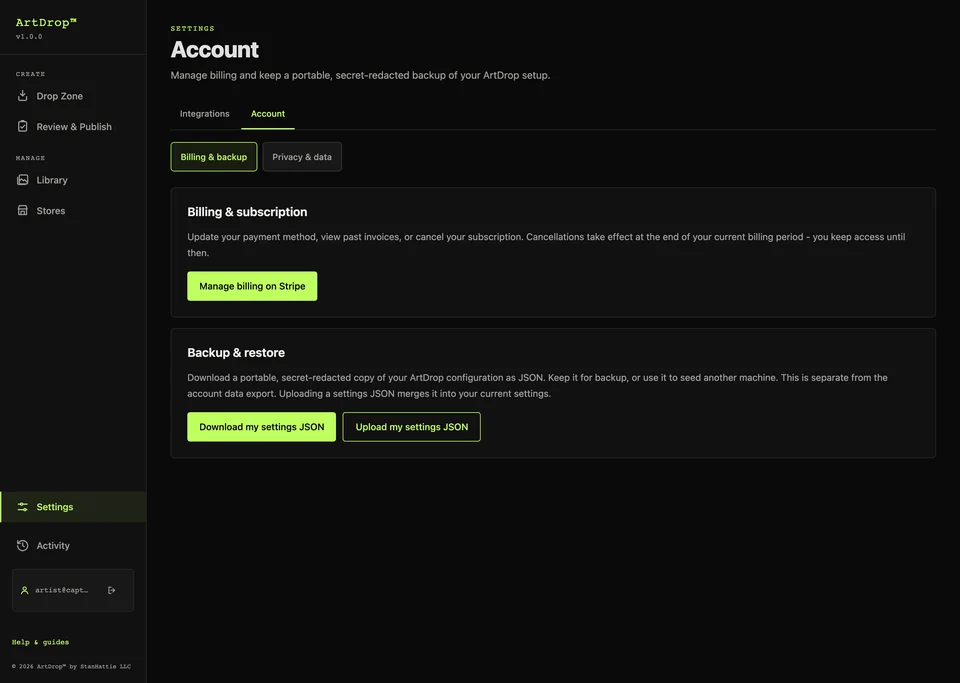
The Account page brings billing and data controls together. Direct purchases use Stripe; Shopify App Store subscriptions are managed through Shopify.
Steps
-
Manage billing
Open your Account page and choose Manage billing. Use the billing service shown for your purchase.
-
Remove an unused paid Web store slot
Deleting a store does not change billing. If all slots are in use, delete an unneeded store first. Open Storefronts and choose Remove one unused slot. If you see Finish previous slot change, choose it to complete the change you already requested. Stripe calculates any billing adjustment. This control applies to unused paid slots on Web subscriptions purchased at getartdrop.com. Store slots already purchased for an existing Mac license remain part of that license, and Shopify App Store subscriptions are managed per shop in Shopify.
-
Request a refund
ArtDrop Web includes a 14-day money-back guarantee. To request a refund, email support@getartdrop.com within 14 days of purchase and include the email address you used at checkout.
-
Back up your settings
Download a settings backup and keep it private. After restoring, reconnect services and check your store settings.
-
Manage your data
Open Data and privacy to request an export or start an account deletion request.
Expected result
You can manage your purchase and keep a copy of the account information you need.
Good to know
- Cancel a Web subscription at any time. Access continues until the end of its billing period.
- Account deletion and subscription cancellation are separate actions. Cancel any active subscription when closing your account.
- Connected services keep their own product and account records. Manage those in the relevant service.
Troubleshooting
- A billing page does not show the purchase? Check whether it was bought through Shopify or directly from ArtDrop.
- An export or deletion request needs help? Contact support with the request confirmation.
How to undo or clean up
Download your data before deleting the account. If deletion is incomplete or the connection is lost, use Open deletion recovery and your saved recovery key to check and continue it. A completed deletion cannot be undone.